When an AI agent's session ends, its output usually disappears into a chat window, a local folder, or a /tmp directory that gets wiped on the next deploy — leaving no way for a downstream agent to retrieve it. To keep agent outputs durable, queryable, and reusable, write them to a session-aware artifact store rather than relying on chat-based artifacts or a raw S3 bucket.
You run an agent. It does good work — it generates a report, writes a module, produces a structured dataset. The session ends.
Where did that output go?
If you're like most developers building on top of Claude, GPT-5.5, or any hosted model, the honest answer is: somewhere inconvenient. Maybe a local folder you'll forget to check. Maybe a chat window that gets buried under the next conversation. Maybe a /tmp directory that gets wiped on the next deploy.
This is one of the most underappreciated problems in AI agent infrastructure, and it quietly kills the ROI of otherwise well-built systems.
Why AI Agent Output Disappears After a Session
There's a lot of great writing on how to improve what agents produce — better prompting, smarter tool use, tighter feedback loops. But almost no one talks about what happens after the agent finishes.
The assumption seems to be that the output lands somewhere sensible by default. It doesn't.
Anthropic has been iterating on this. Claude Artifacts, introduced in 2024, let outputs appear in a dedicated side panel — easier to read and copy, but still locked inside the conversation.
The more recent addition is Claude Code Artifacts, announced June 2026. Claude Code can now publish work-in-progress as a live, interactive web page: PR walkthroughs, dashboards, and release checklists that update automatically as the session runs. It's genuinely useful for human-facing communication inside a team.
But it doesn't solve the underlying problem for agents. Claude Code Artifacts are visual pages for human consumption, and they require a Team or Enterprise plan. As agent infrastructure, they fall short — they:
- Can't be queried programmatically or retrieved by a downstream agent
- Can't be filtered by metadata or accessed outside your organization
- Have no API to fetch them and no session-level index of what was produced
- Offer no TTL control and no content deduplication
They're a collaboration tool, not infrastructure. If a human wants to read a summary of what your agent did, Claude Code Artifacts are great. If another agent needs to consume what the first one produced — or if you need to reconstruct what ran at 2am — they don't help.
3 Scenarios Where Lost Agent Output Hurts
Scheduled and Autonomous Agents
A scheduled agent that runs nightly to generate a report can't wait for a human to copy content from a chat window. It needs to write to a destination that persists, that's queryable, and that downstream systems can read from. Chat is not that destination.
Multi-Agent Pipelines
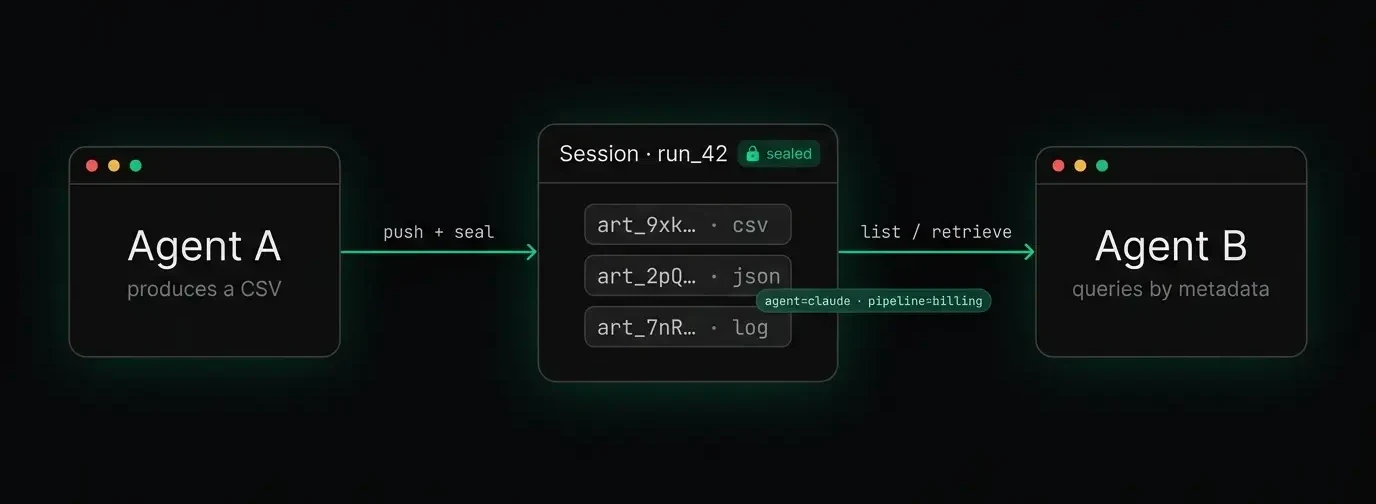
In a multi-agent pipeline, Agent A extracts data and produces a CSV; Agent B analyzes that CSV. If Agent A's output only exists in Agent A's session context, Agent B has no clean way to retrieve it. You end up passing file paths or content through your orchestration layer as strings, which works until it doesn't.
Debugging Failed Pipeline Runs
Something went wrong in step 4 of a 7-step pipeline. You want to inspect exactly what each agent produced at each stage. If outputs were scattered across local files, S3 objects, and chat windows, reconstructing that picture is painful. If they were never persisted at all, it's impossible.
Why S3 Isn't Enough for AI Agent Artifacts
The natural instinct is to point your agents at an S3 bucket — upload the artifact, move on. Object storage works fine for raw blobs. But S3 was never designed for agent output, and the gaps show up quickly:
- No concept of a session or agent run. To retrieve everything a specific pipeline run produced, you have to enforce it through your own key-naming conventions and hope they stay consistent.
- Limited, non-queryable metadata. S3 caps object metadata at 2KB of HTTP headers, and you can't filter by
agent_id=claude-sonnetorpipeline=billing-reconciliationwithout building a separate index yourself. - No content deduplication. If your agent retries and re-uploads the same file, you get two copies. At scale, that adds up.
- No artifact-level TTLs. S3 lifecycle rules operate on prefixes and age — not on whether an artifact belongs to a completed or failed run.
None of these are impossible to solve. But each one requires custom infrastructure on top of S3, and teams building agents are not in the business of building artifact management systems from scratch.
What a Purpose-Built Artifact Store Gives You
An artifact store is a purpose-built layer for agent outputs — not a file manager, not a workflow orchestrator. Specifically, a place where agents push what they produce and retrieve what they need. The primitives that matter:
- Sessions. A session is a logical container for everything one agent run produces. The agent opens a session at the start, every artifact it creates is associated with that session, and the session is sealed when the run finishes. You can then retrieve the complete output of that run with a single query — not by guessing at file paths.
- Metadata indexing. Every artifact gets key-value metadata at upload time (
agent_id,model,pipeline,content_type— whatever you care about), and you query by it later. "Give me every JSON artifact produced by the billing agent in the last 7 days" becomes a single API call, not a grep through S3 logs. - Content-hash deduplication. If an agent retries and produces identical output, the store detects it and returns the existing artifact ID instead of creating a new entry. The blob is stored once, so you don't pay for duplicates and your listings stay clean.
- TTLs (time-to-live). Artifacts expire automatically on a configurable schedule. Short-lived scratch outputs get cleaned up without manual intervention; important outputs get a longer TTL or no expiry at all.
- Shareable links. One call produces a time-limited download URL — ideal for handing an agent's output to a human reviewer, a Slack message, or a downstream service without exposing raw storage credentials.
How an Artifact Store Changes Your Agent Architecture
When agent outputs have a proper home, the entire architecture changes.
Debugging becomes tractable. Every run has a session ID, and every session has a complete list of artifacts with timestamps and metadata. You can reconstruct what any agent produced at any point in a pipeline.
Multi-agent pipelines become cleaner. Agent A seals its session; Agent B queries that session's artifacts by type and picks up exactly what it needs. No file-path management, no shared state in your orchestration layer.
Autonomous agents become genuinely autonomous. A scheduled agent that runs at 2am can produce its outputs, seal its session, and have those outputs immediately available to any downstream consumer — without anyone present to handle the file.
Get Started: Persistent Agent Output in One Command
Artifacta is an artifact store built specifically for AI agents. The Python SDK and CLI cover the common patterns — pushing outputs, querying by session, generating share links, and setting TTLs. There's also an MCP server that lets Claude and Cursor push artifacts directly during a session without any custom integration code.
The free tier covers up to 10,000 artifacts per month — enough to instrument a real project and see whether structured output storage changes how you build.
pip install artifacta-cli

artifacta push output.json --session run_42 --meta agent=claude-sonnet pipeline=billing
That's the whole workflow: push your output, tag it with context, and retrieve it later by querying that context. No custom index to maintain, no lifecycle rules to configure, no naming conventions to enforce.
The session ends. The artifact doesn't.
Artifacta is an artifact store for AI agents. Free tier available at artifacta.io.